


Block Sandbox
Minecraft
5






Overview of Block Sandbox
Block Sandbox is a modern 2D sandbox game that lets you create, edit, and explore your own pixel-based environments. By allowing you to assemble characters, weapons, blocks, and other elements to create unique settings and scenarios, the game fosters creativity and adaptability. Instead of adhering to strict objectives, participants are encouraged to use their creativity and create whatever comes to mind.
How to Play in Block Sandbox
Building and Design
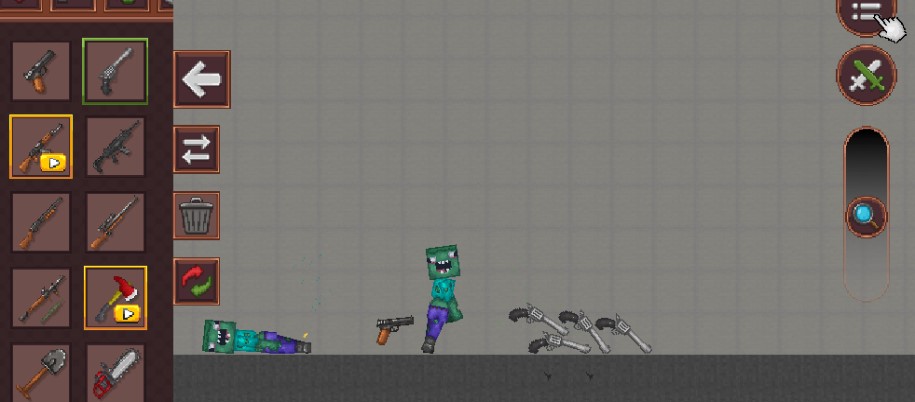
From the menu, you can select various blocks and objects to place anywhere in the environment. This allows you to build structures such as:
- Castles
- Cities
- Battlefields
- Fantasy settings
You are allowed to create and modify your environment whenever you want as there are no restrictions.
Basic Controls
- Use your mouse or touch to select objects, letters, or blocks.
- Drag and drop to position items in the world.
- Use the eraser tool to remove unnecessary characters or blocks.
- Use menu navigation to access categories such as characters, weapons, and scenes.
These controls allow experienced players to design complex landscapes while keeping the game simple for beginners.
Block Sandbox Gameplay Tips
Start with Simple Structures
When you first start playing Block Sandbox, begin by building simple landscapes, houses, or towers. This helps you understand block arrangement strategies before developing more complex and larger designs.
Experiment with Different Block Types
There are many different types of objects and blocks in the game. To build unique scenes like cities, arenas, or forests, try combining different block types. One of the best ways to explore creative potential is through experimentation.
Using characters to create scenarios
Your sandbox world can become more engaging by adding armor, weapons, and characters. To bring your ideas to life, you can create scenarios such as conflict, adventure, or role-playing stories.
Categories & Tags









Discuss: Block Sandbox